Built-In Traceability
Maintain direct traceability between requirements, models, and analysis in a single environment.

Innoslate is a cloud-native, browser-based platform that eliminates complex installations and IT overhead. Access engineering data securely from anywhere.
Innoslate connects requirements, architecture, verification, risks, tests, and program data in one platform, creating a digital thread to reduce rework and improve decision-making.
Innoslate is developed and supported in the United States by SPEC Innovations. Built by American engineers for defense and government missions.
Enable real collaboration across systems engineers, program managers, test teams, and leadership. Built-in workflows and real-time access keep everyone aligned and informed.
Organizations use Innoslate to manage requirements, architecture, verification, and digital engineering across complex programs.
Innoslate is a complete requirements management and project management solution.
Innoslate makes it easy to perform both Test & Evaluation + Verification & Validation in one place.
Manage your team and program through tasks, Kanban Boards, Gantt Charts, and more.
Innoslate combines requirements management, MBSE, traceability, verification, project management, and collaboration in one connected platform.
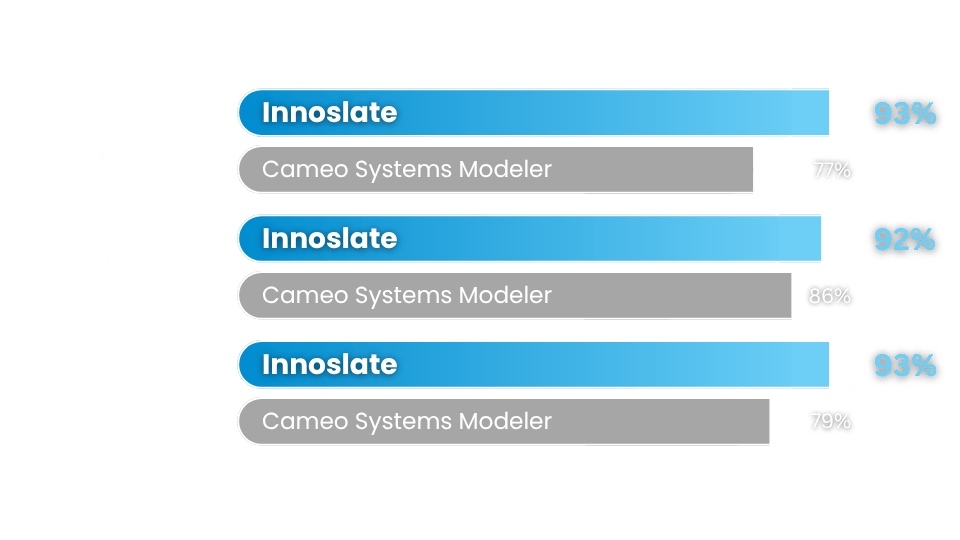
| Innoslate | Cameo | |
|---|---|---|
| Platform & Deployment | ||
| Browser-Based Platform | Limited |
|
| Cloud-Native Deployment | More infrastructure-heavy |
|
| Easy Remote Access | More desktop-dependent |
|
| IT Administration | Lower overhead |
More complex setup |
| Fast Updates & Deployment | More manual administration |
|
| MBSE & Requirements Management | ||
| SysML Support | ||
| Requirements + MBSE Together | Native |
Often separate workflows |
| Data-Centric Engineering | Core philosophy |
More diagram-focused |
| Connected Engineering Data | More siloed workflows |
|
| Built-In Traceability | Requires more setup |
|
| Relationship Visibility | Native |
More model-centric |
| Collaboration & Usability | ||
| Real-Time Collaboration | Limited |
|
| Easier for Non-Modelers | Steeper learning curve |
|
| Cross-Functional Team Access | More specialist-oriented |
|
| Faster Onboarding | More training required |
|
| Stakeholder Reviews | Simpler browser access |
More tooling dependencies |
| AI & Automation | ||
| AI-Assisted Engineering | AI-Assisted Engineering |
Limited |
| AI Requirements Support | Limited |
|
| AI Test Generation | Limited |
|
| Traceability Assistance | Limited |
|
| Quality Checks | Limited |
|
| Program & Verification Management | ||
| Integrated Test Management | Often External |
|
| Verification & Validation | Native |
Limited |
| Built-In Project Management | Limited |
|
| Risk Management | Integrated |
Often separate |
| Live Documents & Reporting | More manual |
|
Learn more about our users and why they choose Innoslate as their MBSE solution.
The ability to see all objects in a view is very helpful to decrease the risk of creating duplicate elements. Being able to tie objects to diagram views and then understandable PM views is also great. My favorite feature is the AI-generated test cases and risks from requirements.
I like having a central location where the entire test team can collaborate and help each other out with data entry. I find it easy to generate reports, and I appreciate the database that keeps all information in one location. The training and demonstrations have been great for getting us up-to-speed in using the application.
I use Innoslate to teach model-based systems engineering. Because it’s a cloud-based software application, students on either a PC or a Mac can start using it right away without needing to install anything on their computers. This is especially valuable for Mac users, who often have to rely on virtualization to run other MBSE software.
This guide details how organizations can successfully transition from CATIA No Magic tools, including MagicDraw, Cameo Systems Modeler, and Cameo Enterprise Architecture, to Innoslate while preserving critical engineering data and expanding lifecycle capabilities. The guide explores the rationale, benefits, and practical considerations for a smooth migration to a modern, cloud-based digital engineering platform.
Maintain traceability, generate multiple engineering views, collaborate in real time, and apply AI using the same connected engineering data.
Maintain direct traceability between requirements, models, and analysis in a single environment.

Easily switch between documents, diagrams, presentations, and matrices without duplication.
Use AI to accelerate modeling, improve quality, and reduce manual effort across your workflow.
It only takes a few moments to signup.