
Letters to Our Younger Selves
.svg) Taylor Duffy : 8/18/22, 1:14 PM
Taylor Duffy : 8/18/22, 1:14 PM
As part of our sponsorship with INCOSE's Empowering Women Leaders in Systems Engineering (EWLSE), we wanted to take our own spin on a book they...

Agile development has transformed how teams capture, prioritize, and implement requirements. Instead of creating lengthy requirements specification documents up front, Agile teams break functionality into small, user-focused stories that can be planned, developed, tested, and refined throughout each iteration.
Well-written Agile stories improve collaboration between stakeholders, developers, systems engineers, testers, and product owners. They help ensure everyone understands who needs something, what they need, and why it matters.
However, user stories should never become isolated pieces of text. Modern engineering organizations need to connect Agile stories to requirements, architecture, verification activities, test cases, risks, and design decisions to maintain complete lifecycle traceability.
With Innoslate, Agile stories become part of a connected digital engineering environment, allowing organizations to manage iterative development without sacrificing systems engineering rigor.
In this blog, you'll learn how to write effective Agile stories, avoid common mistakes, and maintain traceability throughout the development lifecycle.
Agile stories, commonly called user stories, are short descriptions of functionality written from the perspective of the person receiving value.
Unlike traditional requirements that often describe technical implementation details, user stories focus on outcomes.
The standard format is: As a [role], I want [goal], so that [benefit].
For example: As a maintenance technician, I want to receive automatic alerts when equipment exceeds vibration thresholds so that I can schedule maintenance before failures occur.
This simple structure encourages teams to discuss the requirement instead of assuming every detail has already been specified.
User stories are intentionally lightweight. Additional details, including business rules, constraints, interfaces, and acceptance criteria, are added through conversations during backlog refinement and sprint planning.
This format is the most widely used format for Agile user stories because it keeps the focus on the end user's needs and the business value being delivered. While organizations may adapt the wording to fit their processes, the underlying principle remains the same: clearly define who needs the capability, what they need, and why it matters.
For readers looking for additional templates and software-focused examples, AltexSoft provides a helpful overview of common user story formats and writing techniques.
Innoslate enables teams to create Agile stories as structured entities rather than disconnected notes. Each story can be linked directly to:
Stakeholder needs
System requirements
Architecture
Test cases
Verification activities
Risks
Design decisions
This creates a digital thread from initial stakeholder request through implementation and validation.
.webp?width=1920&height=763&name=User%20Story%20Diagram%20(1).webp)
Although both capture what a system should accomplish, they serve different purposes.
| Traditional Requirements | User Stories |
| Focus on system behavior |
Focus on user value |
| Define precise specifications | Encourage discussion |
| Comprehensive and detailed | Lightweight and iterative |
| Often managed through formal change control | Easily reprioritized |
| Written for compliance and engineering rigor | Written for collaboration |
In complex systems engineering environments, Agile practices do not replace disciplined requirements engineering; they enhance it.
Organizations developing defense, aerospace, and other mission-critical systems often use Agile user stories to capture stakeholder needs while maintaining formal requirements, architectures, interface definitions, and verification activities throughout the lifecycle. MITRE highlights that Agile systems engineering can support rapid iteration without abandoning the rigor needed for complex systems.
Rather than replacing requirements, Agile user stories often become the starting point for developing detailed, verifiable system requirements. These stories capture the user's needs and intent, while formal requirements define the precise system behavior, performance, and constraints required to satisfy those needs. For example:
As an operator, I want battery health to be displayed so I know when maintenance is required.
This may eventually produce several requirements:
The system shall calculate battery capacity every 60 seconds.
The display shall show remaining battery life within ±2%.
Battery warnings shall activate below 15%.
This relationship supports the broader requirements-gathering process, in which stakeholder needs evolve into formal system requirements.
Within Innoslate, teams can maintain both artifacts while preserving traceability between them.
📖 Related Reading: Agile Requirements Management: A Practical Guide
Large initiatives are typically broken down into progressively smaller work items.
A broad capability that spans multiple releases.
Example: Remote Fleet Monitoring
A significant capability within the epic.
Example: Predictive Maintenance Dashboard
An individual piece of functionality.
Example: As a fleet manager, I want equipment health displayed on one dashboard so that I can identify maintenance priorities.
Innoslate allows organizations to structure these relationships hierarchically and link them to requirements, architecture models, and verification activities.
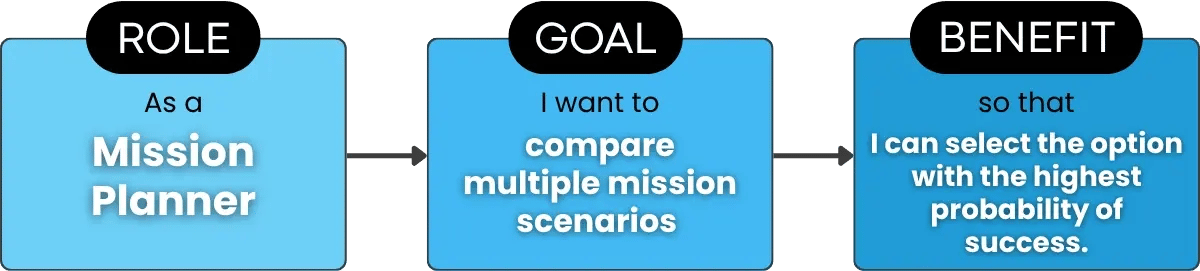
A good Agile story contains three key components.
Who needs the capability?
Examples include:
Operator
System Administrator
Maintenance Technician
Mission Planner
Product Owner
Understanding the user helps development teams prioritize functionality and contextualize operations.
What does the user want to accomplish? The goal should describe an outcome rather than a technical implementation.
Instead of: Add a SQL database.
Write: Access historical sensor readings.
Why does it matter? The benefit communicates business or mission value.
Examples include:
Reduce maintenance costs
Improve safety
Accelerate decision-making
Increase operational awareness
Improve user productivity
Putting everything together: As a mission planner, I want to compare multiple mission scenarios so that I can select the option with the highest probability of success.
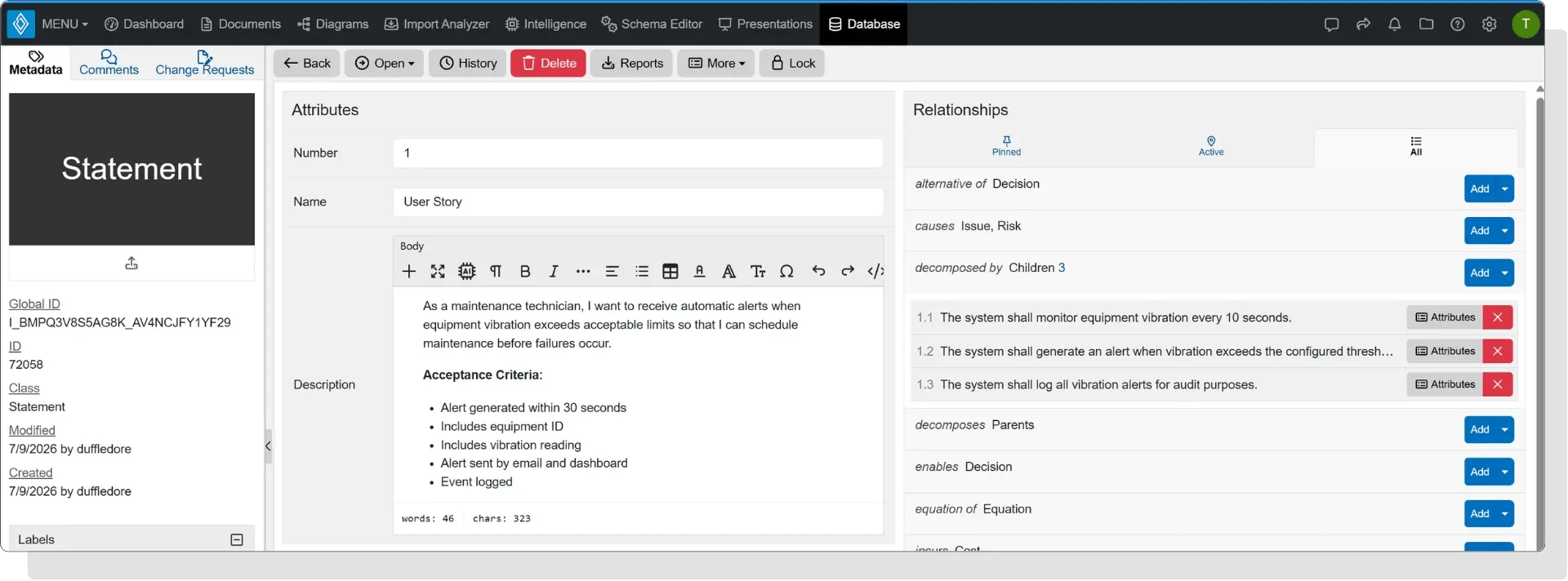
User stories describe what should happen. Acceptance criteria define how teams know the story is complete.
Good acceptance criteria are:
Specific
Measurable
Testable
Unambiguous
Example:
As a warehouse manager, I want inventory alerts so that stock shortages are prevented.
Alert appears when inventory falls below configured thresholds.
Notifications are sent within one minute.
Alert includes affected product ID.
Alerts remain active until inventory is replenished.
In Innoslate, acceptance criteria can be linked directly to verification methods and test cases, simplifying verification planning later in the lifecycle.
As a customer, I want to reset my password using email verification so that I can regain account access securely.
Verification email sent within 30 seconds.
Reset link expires after 15 minutes.
Password meets security policy.
As a satellite operator, I want automatic fault notifications so that anomalies can be addressed before mission performance degrades.
Fault detected within 10 seconds.
Notification includes subsystem ID.
Critical faults trigger escalation procedures.
All events recorded for audit purposes.
As a mission commander, I want a common operational picture that updates automatically so that I can make timely tactical decisions.
Operational data refreshes every 30 seconds or less.
Friendly and adversary assets are displayed with current location information.
Users can filter the display by mission area, unit, or asset type.
Data synchronization failures generate an alert within one minute.
All updates are logged for audit and mission replay.
As a production supervisor, I want equipment utilization displayed in real time so that production bottlenecks can be identified quickly.
Dashboard refreshes every 60 seconds or less.
Equipment utilization is displayed for every production line.
Utilization below the configured threshold is highlighted automatically.
Users can filter utilization data by production line and shift.
Historical utilization data is retained for at least 90 days.
Poor: Install PostgreSQL.
Better: As an analyst, I want reliable access to historical data so that I can generate reports.
If a story cannot reasonably be completed during one iteration, split it into smaller stories.
Every story should explain why the work matters.
Avoid: As a user, I want reports, dashboards, alerts, exports, and notifications...
Break this into multiple stories.
Without acceptance criteria, teams interpret "done" differently.
Stories disconnected from requirements, design, or testing become difficult to manage as projects scale.
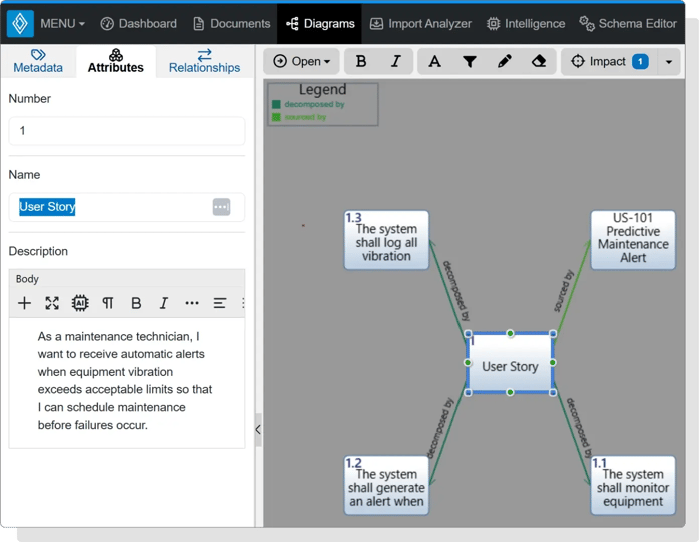
Innoslate helps eliminate this issue by linking every story to related engineering artifacts.
To write stronger Agile stories:
Keep stories focused on user value.
Write from the user's perspective.
Include measurable acceptance criteria.
Keep stories small enough for a sprint.
Refine stories collaboratively.
Prioritize based on business value.
Maintain traceability throughout development.
Review and update stories as requirements evolve.
Within Innoslate, teams can continuously refine stories while preserving version history and maintaining relationships with requirements, architecture, verification, and testing artifacts.
Agile teams move quickly, but speed should never come at the expense of traceability.
As stories evolve into detailed requirements, organizations must understand:
Which stakeholder requested the capability?
Which system requirement satisfies it?
Which subsystem implements it?
Which tests verify it?
Which changes affected it?
Without this visibility, impact analysis becomes difficult, compliance efforts become time-consuming, and engineering risk increases.
Innoslate solves this challenge by connecting Agile stories to every stage of the engineering lifecycle through a model-based digital thread. User stories can be linked directly to stakeholder needs, system requirements, architecture, verification methods, test cases, risks, and design decisions. When a story changes, teams can quickly identify downstream impacts across the entire project.
This connected approach allows organizations to combine Agile flexibility with the traceability required for complex systems engineering, defense, aerospace, healthcare, and other regulated industries.
📑 Guide: Agile Application Lifecycle Management
Effective Agile stories help teams deliver value faster, improve stakeholder collaboration, and adapt to changing priorities. But as projects grow in complexity, those stories need to remain connected to the rest of the engineering lifecycle.
With Innoslate, organizations can capture Agile stories, develop detailed requirements, manage architecture, perform impact analysis, and maintain end-to-end traceability within a single cloud-native platform. Whether you're developing software, complex systems, or mission-critical products, Innoslate helps bridge Agile development with model-based systems engineering.
Explore how Innoslate helps teams write, manage, and trace Agile stories from concept through verification.

Continue Learning:
%20(200%20%C3%97%20100%20px)%20(800%20%C3%97%20400%20px)%20(21).png)
Taylor Duffy : 8/18/22, 1:14 PM
As part of our sponsorship with INCOSE's Empowering Women Leaders in Systems Engineering (EWLSE), we wanted to take our own spin on a book they...
.svg)
.svg) SPEC Innovations Team : 11/29/23, 3:22 PM
SPEC Innovations Team : 11/29/23, 3:22 PM
Don't feel like reading? Watch the video instead! By Amir Abrari, Dominic Galarza, and Chris Howard In a world where precision and efficiency are...

Taylor Duffy : 9/30/24, 1:35 PM
Validation is concerned with whether the system fulfills its intended purpose and meets the user’s requirements. It answers the question: "Are we...